

7+ Best Restaurant CRM Platforms to Boost Revenue
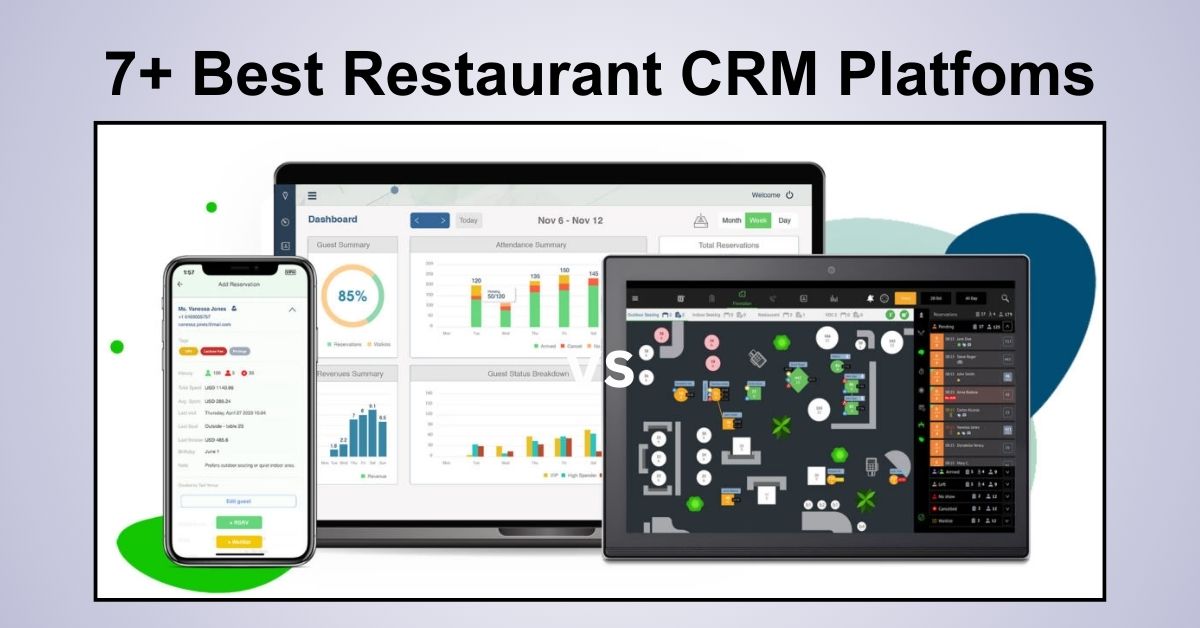
Running a successful dining establishment requires more than just excellent food and service; it requires data.
When profits are tight, building repeat customer relationships determines whether a business can succeed.
A restaurant CRM plays a crucial role as a high-value business asset.
Industry statistics frequently highlight the “80/20 rule,” suggesting that nearly 80% of your future revenue will likely come from just 20% of your loyal customer base.
To tap into this revenue stream, you need tools that go beyond simple point-of-sale transactions. You need a system that understands your guests.
In this guide, we will explore the top software solutions available, analyzing their features, pricing, and how they can transform your guest management software strategy.
To ensure your CRM strategy works seamlessly online, choosing a purpose-built website is essential—the Restaurant WordPress Theme – RestaurantWP by PhysCode offers a professional, conversion-focused foundation that integrates smoothly with reservations, guest data, and marketing tools.
What is a Restaurant CRM?
For those seeking a quick definition for restaurant CRM, here is a concise breakdown:
A restaurant CRM (Customer Relationship Management) is a specialized software platform designed to collect, organize, and utilize guest data.
Unlike a standard generic CRM, these tools are tailored to the hospitality industry to track dining habits, allergies, seating preferences, and visit frequency.
Key functions include:
- Centralizing Data: Merging data from reservations, online orders, and POS systems.
- Personalization: Enabling staff to greet guests by name and know their favorite wine.
- Marketing: Marketing automation emails for birthdays, anniversaries, or re-engagement campaigns.
Why Your Business Needs a CRM
Before diving into the reviews, it is essential to understand the value proposition. Why should a restaurant owner invest time and budget into a restaurant CRM?
1. Driving Customer Retention
Acquiring a new diner is significantly more expensive than retaining an existing one. A CRM allows you to identify guests who haven’t visited in 90 days and automatically send them a “We Miss You” offer, effectively boosting customer retention.
2. Increasing Average Ticket Size
When you know a guest’s history, you can upsell effectively. If your data shows a customer frequently orders premium steaks, your server can recommend a high-end pairing, increasing the bill naturally.
3. Operational Efficiency
Modern systems automate the busy work. Instead of manually sorting through reservation books to find VIPs, the software highlights them automatically, saving your front-of-house team hours of work.
Top 7 Restaurant CRM Platforms Reviewed
We have analyzed the market to bring you the seven most capable systems, categorized by their strongest use cases.
1. SevenRooms

Best For: Upscale venues prioritizing direct guest relationships.
SevenRooms focuses heavily on data ownership. Unlike some platforms that keep guest data behind a wall, SevenRooms gives operators full access to build detailed guest management software profiles. It is designed to provide a “white-glove” experience before the guest even walks through the door.
Standout Features:
- Auto-Tagging: Automatically applies tags like “VIP” or “High Spender” based on POS data.
- Review Aggregation: Collects feedback privately before it hits public review sites.
- Direct Booking: Prioritizes reservations through your own website to save on commission fees.
Pricing:
- Quote-based (varies by location size and volume).
2. HubSpot

Best For: Growth-focused restaurants needing powerful marketing automation.
HubSpot creates a unified ecosystem for your business. While many tools focus solely on reservations, HubSpot excels at connecting your operations, sales, and marketing teams. It allows you to treat your diners like clients, tracking every interaction from their first website visit to their latest meal.
Standout Features:
- Robust Free Tier: Includes unlimited contact storage and email tools, making it accessible for startups.
- Smart Segmentation: Group customers by behavior (e.g., “Big Spenders” or “Lunch Regulars”) for targeted campaigns.
- Integration Ecosystem: Connects easily with various website builders and third-party apps.
Pricing:
- Free: Includes essential CRM tools and email marketing.
- Starter: Approx. $15/month/user for removed branding and expanded limits.
- Professional: Higher-tier pricing for advanced automation and reporting.
3. OpenTable

Best For: New restaurants seeking maximum visibility.
OpenTable is the heavy hitter in terms of consumer network size. Its primary strength lies in its reservation system, which doubles as a discovery engine. Millions of diners use the app to find places to eat, making it a powerful marketing channel for filling empty seats.
Standout Features:
- Diner Network: Instant access to a massive database of potential customers.
- Marketing Campaigns: Tools to target diners looking for tables in your specific area.
- Guest History: Basic tracking of visit frequency and notes.
Pricing:
- Basic: Starts around $149/month.
- Core & Pro: Higher tiers available for advanced relationship features.
4. Resy

Best For: Trendy, high-demand establishments.
Resy has carved out a niche among the “cool” crowd. It offers a sleek interface and is often used by establishments that deal with high demand and waitlists. It is less about mass marketing and more about managing exclusivity and access.
Standout Features:
- Notify Me: An automated waitlist feature that fills cancellations instantly.
- Table Management: sophisticated visualization of the dining room.
- No-Show Protection: Features to reduce revenue loss from skipped reservations.
Pricing:
- Platform: Typically starts around $249/month.
5. Toast

Best For: Operations wanting an all-in-one POS and CRM hybrid.
Toast is primarily known as a Point of Sale system, but its integrated CRM capabilities are formidable. Because the CRM is built directly into the transaction terminal, the data capture is seamless. You do not need to integrate two different systems; the credit card swipe captures the data instantly.
Standout Features:
- Loyalty Integration: Points are added automatically at checkout.
- Purchase-Based Marketing: Send emails specifically to people who ordered a specific dish (e.g., “Our seasonal Lobster Risotto is back!”).
- User-Friendly Interface: Easy for staff to learn quickly.
Pricing:
- Starter Kit: Free options available.
- POS Plan: Starts at $69/month (hardware costs may apply).
6. Tock

Best For: Ticketed dining, pop-ups, and prepaid experiences.
Tock revolutionized the industry by introducing the concept of “tickets” for dinner. If your restaurant offers tasting menus, wine pairings, or special events, Tock is the superior choice. It helps secure revenue upfront, significantly reducing the financial impact of no-shows.
Standout Features:
- Prepaid Reservations: Collect deposits or full payment at booking.
- Event Management: Specialized tools for organizing special culinary events.
- Hospitality Dashboard: A clean view of guest preferences and notes.
Pricing:
- Basic: $79/month.
- Plus & Pro: Scales up to $399/month for advanced features.
7. EatApp

Best For: Budget-conscious owners needing flexibility.
EatApp offers a solid balance of features without the enterprise-level price tag. It provides strong table management and reservation system capabilities while offering white-label options, allowing your brand to shine rather than the software provider’s logo.
Standout Features:
- White-Labeling: Customize the booking widget to match your website design perfectly.
- Multi-Unit Support: Manage several locations from a single login.
- Cross-Platform: Works well on iPads, desktops, and mobile phones.
Pricing:
- Free Tier: Available for low-volume venues.
- Paid Plans: Start at $49/month.
5 Essential Features to Look for in a Restaurant CRM
When shopping for software, do not get distracted by bells and whistles. Focus on these five core competencies:
- Deep Guest Profiling: The system must record allergies, birthdays, and anniversaries.
- Seamless POS Integration: If the CRM doesn’t talk to your register, your data will be incomplete.
- Automated Marketing: Look for marketing automation that triggers emails based on behavior (e.g., “You haven’t visited in 60 days”).
- Feedback Management: Tools that survey guests immediately after their meal.
- Robust Reporting: Dashboards that clearly show ROI, cover counts, and server performance.
How to Choose the Right Platform: A Step-by-Step Guide
Selecting the right restaurant CRM can feel overwhelming. Follow this simple framework to make the best decision.
Step 1: Audit Your Operations Map out your customer journey. Do you rely on walk-ins or reservations? Do you do takeout? Choose a system that matches your primary service model.
Step 2: Define “Must-Have” vs. “Nice-to-Have” If you run a casual burger joint, you need speed and loyalty points. If you run fine dining, you need detailed guest notes and allergy tracking. Prioritize accordingly.
Step 3: Evaluate Ease of Use The restaurant industry has high staff turnover. Your software must be intuitive enough for a new hire to learn in 15 minutes. Complex systems often go unused.
Step 4: Calculate Total Cost of Ownership Look beyond the monthly fee. Are there per-cover charges? Setup fees? Contract lock-ins? Ensure the pricing model scales sustainably as your business grows.
Summary
A restaurant CRM is no longer a luxury—it is a necessity for survival and growth. Whether you choose a powerhouse like HubSpot for its marketing capabilities, a network-heavy tool like OpenTable for visibility, or a specialized system like Tock for prepaid experiences, the goal remains the same: knowing your customer better.
By leveraging these tools, you can transform anonymous transactions into lasting relationships, securing the long-term profitability of your restaurant.
FAQs About Restaurant CRM
What is the best CRM for small restaurants?
For small businesses, HubSpot is often the best choice because it offers a robust free tier that includes contact management and email marketing. This allows smaller venues to build a database without high upfront costs.
Do I need a CRM if I already have a POS system?
Yes, while a POS tracks transactions, a CRM tracks relationships. A CRM gives you context behind the data, such as knowing that a specific customer visits every anniversary, allowing you to personalize their experience and increase retention.
How does a Restaurant CRM help with marketing?
A CRM segments your customers based on their dining habits, allowing you to use marketing automation to send relevant offers. For example, you can automatically email a discount voucher to customers who haven’t visited in three months to encourage them to return.
Read more: How To Embed TripAdvisor Reviews in WordPress: A Simple Guide
You may also like
Best Hostings for Travel WordPress Website (Speed & SEO)
Posted on May 19, 2026Choosing a reliable hosting provider is one of the most critical decisions you will make when building an online presence. For a travel-focused website, your platform depends heavily on rich media, high-resolution image galleries, and interactive maps to captivate your audience. Without a solid, high-performance foundation underneath, slow loading screens will quickly frustrate visitors

7+ Best Help Desk Software for Travel and Hospitality
Posted on December 2, 2025Are you overwhelmed by a flood of booking inquiries, last-minute cancellations, and guest requests scattered across email, phone calls, and social media?
In the travel and hospitality industry, response time is the currency of trust.
A delayed response to a traveler stranded at an airport or a guest