

How to Speed Up WordPress Travel Website for Better SEO
Website speed has evolved from a technical luxury to a fundamental requirement for any successful digital presence. For travel websites, where high-resolution imagery and interactive booking features are essential, balancing rich content with fast load times is a unique challenge. When you speed up WordPress travel website performance, you are directly investing in your site’s ability to compete in a crowded global marketplace. This is especially vital if you utilise an online booking system, as any delay during the reservation process can lead to abandoned carts and lost revenue.
In the travel industry, users often search for information while on the move, frequently relying on mobile networks or inconsistent public Wi-Fi. A site that loads slowly under these conditions loses the user. Search engines like Google have recognised this behaviour, making page speed a core component of their ranking algorithms. To maintain a competitive edge and ensure your content reaches its intended audience, understanding and implementing speed optimisation is no longer optional.
This guide provides a comprehensive look at how to optimise travel blog speed without compromising the visual depth that makes travel content so compelling.
Why Page Speed Is a Big Deal
In the world of SEO, speed isn’t just an optional feature; it’s a critical ranking factor. Google has made it very clear that user experience is a priority, and nothing ruins an experience faster than a sluggish site.
For travel websites, the stakes are even higher. Many of your users are likely browsing on mobile devices while using unstable data roaming or slow hotel Wi-Fi. If your site isn’t optimised, they simply won’t wait.
Furthermore, Google uses a set of metrics called core web vitals travel site owners need to pay attention to. These metrics measure things like how quickly your main content appears and how stable the layout is as it loads. A fast site leads to:
- Lower Bounce Rates: Users stay longer when pages snap into view.
- Higher Conversions: Whether it’s an affiliate link or a booking form, speed removes the friction between “looking” and “buying.”
- Better Search Rankings: Google rewards fast websites with better visibility in search results.
What Does Website Speed Optimisation Involve?
When we talk about how to optimise travel blog speed, we are looking at a combination of heavy elements and technical refinements. At its core, speed optimisation is the process of reducing the weight of your website files and making it easier for a user’s browser to download them.
Optimisation generally involves three main pillars:
- The Server Side: This is where your website lives (your hosting). If the foundation is slow, the rest of the site will be too.
- The Asset Side: This involves your images, videos, and scripts. For travel sites, this is usually where 80% of the slowdown occurs.
- The Delivery Side: This is how your content travels from the server to the user, involving things like caching and Content Delivery Networks (CDNs).
By addressing all three, you can significantly improve booking site performance and ensure your visitors have a smooth experience from the homepage to the checkout screen.
The Roadmap: How to Speed Up Your Travel Site
To get your site running like a well-oiled machine, we need a systematic approach. While I will dive into the technical “how-to” for each of these in our next session, here is the bird’s-eye view of the steps we will take:
- Audit Your Current Performance: Using tools to see where you currently stand.
- Choose a High-Performance Foundation: Ensuring you are using a fast loading travel theme that WordPress developers recommend.
- Aggressive Image Optimisation: Learning how to compress photos without losing their “wow” factor.
- Implement Smart Caching: Storing “snapshots” of your site to serve them faster.
- Clean Up Your Plugins: Removing the “bloat” that slows down your booking engines and maps.
- Use a Global CDN: Delivering your travel content from a server closest to your reader.
1. Control the WordPress Heartbeat API

WordPress comes with a built-in feature called the Heartbeat API. It allows your browser to communicate with the server while you’re logged into the admin dashboard. While it’s useful for things like autosaving posts or showing real-time plugin notifications, it can be a massive drain on your server’s CPU.
When you’re working on a travel blog with high-res galleries or a complex booking engine, the Heartbeat API sends a pulse every 15 to 60 seconds. If you leave your dashboard open in multiple tabs, these pulses stack up and slow down your entire site for actual visitors.
To speed up the performance of your WordPress travel website, you don’t necessarily need to disable this feature entirely, but you should definitely lean it out.
- Use a Plugin: I recommend the Heartbeat Control plugin. It’s free and lets you choose where to disable the API (like the frontend or the post editor).
- The Best Setting: Most experts suggest disabling Heartbeat on the “Frontend” and “Dashboard,” and increasing the interval to the maximum (60 seconds) for the “Post Editor.”
Pro Tip: By reducing these server requests, you free up “bandwidth” for your server to focus on delivering your content to your readers faster.
2. Choose a High-Performance Foundation

The foundation of your site is your theme. Many travel-specific themes come “bloated” with built-in music players, heavy sliders, and unnecessary animations that look pretty but destroy your load times. To improve booking site performance, you need a theme that is built for speed from the ground up.
A fast loading travel theme WordPress developers swear by is “modular.” This means the theme only loads the code required for the specific page the user is viewing, rather than loading everything all at once. If you are unsure where to start, learning how to choose a travel WordPress theme based on performance metrics is the first step toward a faster site. So when you choose a theme, keep in mind these criteria.
- Lightweight File Size: Look for themes that are under 50KB in total size.
- Elementor Compatibility: If you love designing visually, ensure the theme is optimised for page builders so it doesn’t add extra bloat to your code.
- Native Core Web Vitals Support: Check the theme description for mentions of core web vitals travel site optimisation. If the developer doesn’t mention speed, it’s probably not a priority for them.
Switching from a bloated “all-in-one” travel theme to a lightweight foundation can instantly shave 1–2 seconds off your load time. It is much easier to add features to a fast theme than to try to “fix” a slow, heavy one.
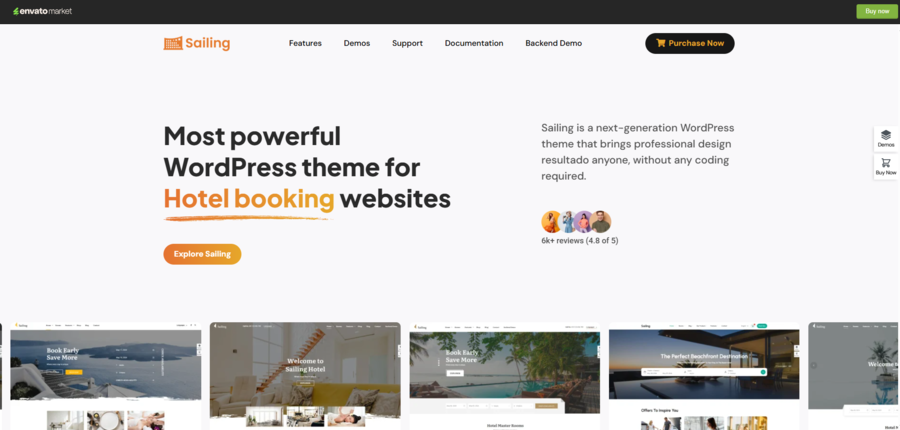
Expert Pick: For those managing accommodations, the Sailing theme is an excellent choice. It is specifically designed to handle complex booking engines without the usual speed penalties. It’s a fast loading travel theme that WordPress developers recommend because it integrates seamlessly with booking plugins while keeping your core web vitals travel site metrics in the green.
3. Aggressive Image Optimisation: Compressing Without Quality Loss
Visuals are the key factor of travel content. Whether it is a high-resolution sunset over the Amalfi Coast or a detailed map of a hiking trail, your readers expect crisp, immersive imagery. While many creators now use the best AI photo generator tools to create unique featured images, these high-detail files are often the reason travel sites fail speed tests if left unoptimized. However, unoptimized photos are the reason travel sites fail speed tests. To optimise travel blog speed, you must try to compress the file.
When you upload a 5MB photo straight from your camera, you are essentially forcing your visitor to download a massive file that their screen can’t even fully display. This results in poor Core Web Vitals travel site scores, particularly for “Largest Contentful Paint” (LCP).
How to Optimise Your Travel Gallery:
- Resize Before You Upload: Never upload a 4000px-wide image if your blog container is only 1200px wide. Use a tool like Photoshop or a free online resizer to crop images to the maximum width they will actually appear on your site.
- Adopt Modern Formats (WebP): WebP is a modern image format that provides superior compression. On average, WebP files are 25-34% smaller than equivalent JPEGs without any noticeable loss in quality. Most WordPress plugins can now automatically convert your library to WebP.
- Implement Lazy Loading: This ensures that images only load when they are about to enter the user’s viewport (as they scroll down). This is a massive win for fast-loading travel theme WordPress setups because it prevents the browser from trying to download 20+ photos the moment the page opens.
4. Implement Smart Caching: Serving “Snapshots” for Speed
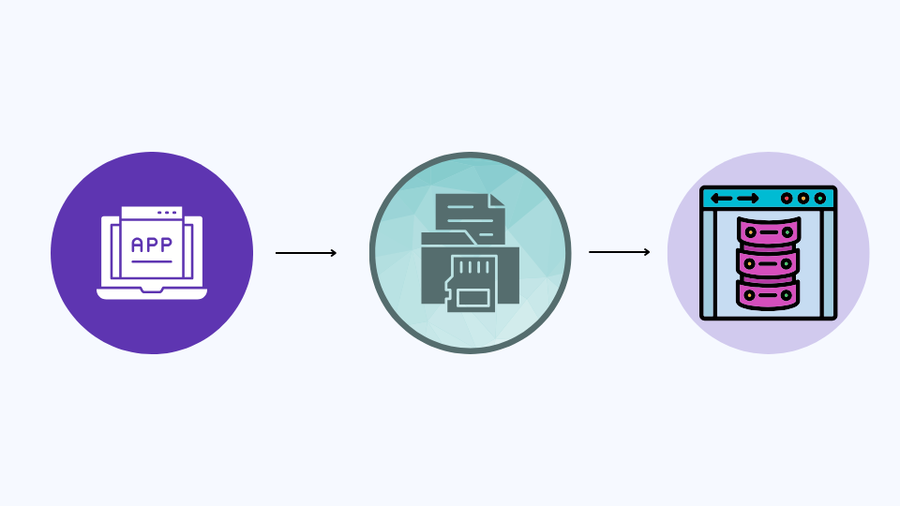
Every time a user visits a WordPress page, their browser has to ask your server to build that page from scratch, fetching the header, the sidebar, the post content, and the footer from the database. This request and response cycle takes time. To speed up WordPress travel website load times, you need to implement a caching strategy.
Caching creates a static HTML snapshot of your page. Instead of building the page for every new visitor, your server simply hands them the pre-built snapshot. This reduces the load on your server’s memory and makes the page appear almost instantly.
The Three Layers of Travel Site Caching:
- Page Caching: This is the most basic form. It saves the entire HTML of a page. For travel blogs with static articles, this is essential.
- Browser Caching: This tells the visitor’s browser to store certain files (like your logo or CSS files). When they click on a second article on your site, their browser doesn’t have to download those files again.
- Object Caching: If you run a high-traffic site or a complex booking system, object caching helps speed up database queries. This is vital to improve booking site performance during peak travel booking seasons.
Without caching, your server might struggle to handle more than a few visitors at once. With a solid caching plugin, your site can handle a surge in traffic from a viral social media post without slowing down or crashing.
5. Disable Intensive Features, Scripts, and Redundant Functions
As a travel site grows, it’s common to keep adding plugins like interactive weather widgets, live currency converters, or heavy Google Maps integrations. While these provide value, they often rely on external scripts that force the user’s browser to wait for a response from another server. To truly improve booking site performance, you need to be ruthless about what stays and what goes.
Every external script or complex function adds a request. If your site has 100+ requests, your core web vitals travel site scores will suffer. You want to streamline the technical background of your site so that the path from clicking a link to seeing the content is as short as possible.
Strategies for De-Bloating Your Site:
- Disable Emojis and Embeds: By default, WordPress loads a script to support emojis and another to handle “oEmbeds” (like Twitter or YouTube previews). If you don’t use these features heavily, you can disable them.
- Lazy Load Video and Maps: If you have a YouTube video of a destination or an interactive map of a hotel, don’t let it load immediately. Use placeholders so the video or map only initialises when the user actually clicks on it.
- Limit External Fonts: Every different font weight and style you use adds weight. Stick to two web-safe fonts and host them locally on your own server rather than fetching them from Google Fonts every time a page loads.
Often, a booking plugin will load its code on your “About” page, where it isn’t even needed. Disabling scripts on a page-by-page basis is a secret weapon to speed up WordPress travel website performance.
6. Clean Up and Audit Your Plugin Library

It is tempting to install a new plugin for every small problem you face, but a “plugin-heavy” site is a slow site. Not all plugins are created equal; some can be poorly coded and can lead to memory leaks or database bloat. To maintain a fast-loading travel theme WordPress environment, you must perform regular audits.
A high plugin count doesn’t just slow down the frontend; it makes your WordPress admin dashboard sluggish, making it harder for you to publish content quickly.
How to Conduct a Plugin Audit:
- The “Rule of One”: If you have three different plugins for SEO, social sharing, and image compression, see if you can find one suite that does it all.
- Identify Resource Hogs: Find which plugins are taking the longest to load or making the most database calls. Once you identify the culprit, look for a lightweight alternative.
- Delete, Don’t Just Disable: Many users simply “Deactivate” plugins they aren’t using. However, deactivated plugins can still pose a security risk and clutter your database. If you don’t need it, delete it entirely.
A clean site is a fast site. By keeping your plugin list lean and only using well-vetted, high-performance tools, you ensure that your server’s resources are dedicated to serving your travellers rather than processing background junk.
Frequently Asked Questions (FAQs)
How fast should my travel website be?
Ideally, your site should load in under 2 seconds. If your sites are taking longer than 3 seconds to load, you will likely lose a lot of customers.
Will optimising my speed hurt my photo quality?
Not at all! By using modern formats like WebP and compression, you can reduce file sizes by up to 70% without any visible loss in quality to the human eye.
Does my WordPress theme really matter for speed?
Yes. A heavy, poorly coded theme can add seconds to your load time. Switching to a fast loading travel theme WordPress is often the quickest way to see a massive jump in performance.
Is speed more important for mobile or desktop?
Both matter, but mobile is where the battle is won. Since Google uses “mobile-first indexing,” your mobile speed is the primary factor determining your SEO rankings.
Conclusion
Speed optimisation is a continuous commitment to providing the best possible experience for your audience. By systematically addressing your site’s foundation with a fast loading travel theme WordPress, mastering the nuances of image compression, and keeping a watchful eye on your core web vitals travel site metrics, you build a resilient digital asset. Remember, every second you shave off your load time is a barrier removed between a potential and paying customer.
The digital landscape is moving toward a faster, more mobile-centric future. Take these steps one by one, audit your progress regularly, and watch as your engagement grows and your bounce rates disappear.
Read more: WP Hotel Booking Review: The Best Hotel Booking Plugin?
You may also like
8 Common Travel Website Design Mistakes That Can Reduce Bookings
Posted on June 25, 2026Think about the last time you booked a trip online. You probably had five different browser tabs open, comparing flights, hotels, and local tour operators. You were looking for the perfect getaway, but you were also looking for a seamless experience. Now, think about what made you close some of those tabs without buying.


How to Add Customer Reviews to Travel Website
Posted on June 22, 2026When planning a vacation, a weekend getaway, or a guided tour, travellers naturally want reassurance from real people who have already spent their hard-earned money on those experiences. Because they cannot physically test your travel services before purchasing, they look for visual indicators of safety, quality, and reliability. Adding genuine feedback directly onto your