

How to Create a Restaurant Website with WordPress: A Complete Guide
Let’s be honest: your physical storefront isn’t the first thing your customers see anymore. For most diners, their first “visit” to your restaurant happens on a smartphone screen while they’re sitting on their couch.
If your online presence is just a link to a third-party delivery app or, worse, a PDF menu that’s impossible to read on a phone, you are leaving money on the table.
In this guide, we’re going to walk through how to create a restaurant website with WordPress, one that doesn’t just look good, but actually brings in more bookings and orders.
Why Your Restaurant Needs a Website (And Not Just Social Media)
Relying solely on Instagram or Facebook is like building your dining room on a rented lot where the landlord can change the rules at any moment. While social media is excellent for engagement, a dedicated website is your digital home. Most diners visit a restaurant’s website before they ever step through the door. If they cannot find a professional site or visible digital presence, they often assume your business is outdated.
Beyond just looking professional, a website is a profit-saving machine. Third-party delivery apps often take a massive cut of every order. By using a tailored restaurant website builder, you can handle orders directly and keep that revenue in your pocket.
Furthermore, a refined website appears in local search results when customers look for “best food near me,” a feat that social media profiles rarely achieve. It is about building trust, establishing professional credibility, and protecting your bottom line from middleman fees.
Why WordPress is the Right Choice for Your Business

When choosing a platform, you might be tempted by “closed” builders, but most restaurant owners eventually switch to WordPress for one reason: total control. WordPress powers about 43% of the internet because it offers complete ownership of your data, customer lists, and content. Unlike other platforms, you are not locked into a monthly subscription that can spike in price or limit your creative growth.
If you want a specific restaurant WordPress theme that perfectly matches your brand’s atmosphere, you have thousands of options at your fingertips. And when you need to add a restaurant booking system WordPress plugin to manage your busy Friday night rush, you can install one in minutes.
The beauty of WordPress is its scalability. You might start with a simple page today, but next year you can easily add a loyalty program or a refined online restaurant menu WordPress without having to rebuild from scratch. It is the most cost-effective and flexible choice for a business that plans to grow.
The Roadmap: Steps to Create a Restaurant Website with WordPress
To build a site that actually works for your business, we will follow these logical steps.
Step 1: Secure Your Domain and Hosting
Step 2: Install WordPress and Basic Setup
Step 3: Choose a Professional Restaurant WordPress Theme
Step 4: Build Your Online Restaurant Menu WordPress
Step 5: Integrate a Restaurant Booking System WordPress
Step 6: Configure Direct Online Ordering
Step 7: Launch and Local Search Refinement
Step 1: Secure Your Domain and Hosting
The first step to create a restaurant website with WordPress is claiming your piece of the internet. This starts with your domain name, which is the address customers type into their browsers to find you.
Ideally, this should be the exact name of your restaurant. If that is already taken, try adding your city or a word like “bistro” or “eats” to the end.
You want a name that is easy to spell and even easier to remember. Avoid hyphens or complex strings of numbers that might confuse a hungry customer trying to find your menu quickly.
Once you have a name, you need a hosting provider. This is the service that stores your website’s files and serves them to visitors. Look for a provider known for reliability and fast loading times. While cheap hosting might seem attractive, it often leads to a slow site that frustrates users. Choose a reputable host that offers a simple setup process, as this will make the following steps much smoother for you.
Step 2: Install WordPress and Basic Setup
With your hosting ready, the next task is to install the WordPress software. Most modern hosting providers offer a simple, one-click installation process that handles the technical heavy lifting for you.
You will simply have to fill in a few details, such as your site title and administrative login credentials, and the system will set everything up in the background. Once the installation finishes, you can log in to your dashboard, which serves as the central command centre for your entire website.
First, ensure your site has a security certificate (SSL), which most hosts provide for free; you may also want to look into thebest wordpress security pluginsto keep customer data safe and show a padlock icon in the browser.
Next, go to the settings and clean out the default posts and comments that come pre-installed. Setting a clean foundation at this stage prevents clutter later on and allows you to focus entirely on building a high-performing restaurant website builder experience for your future diners.
Step 3: Choose a Professional Restaurant WordPress Theme
Now comes the visual part: selecting a restaurant WordPress theme. Your theme dictates the layout and general feeling of your site, so it needs to reflect the atmosphere of your dining room. However, do not choose based on looks alone.
A refined theme for a restaurant must be responsive, meaning it automatically reconfigures itself to look beautiful on a smartphone. Since many people look for places to eat while they are on the move, a mobile-friendly design is a requirement, not an option.
When browsing options, look for themes that include built-in layouts for a menu or a reservation area. This will make it much easier to integrate your online restaurant menu WordPress or your restaurant booking system WordPress later. A good theme should also be lightweight to ensure fast loading times.
You want a design that highlights your food photography and makes it effortless for a visitor to find your address, hours, and contact information without having to hunt through complicated navigation menus.
Here are some professional restaurant-focused themes that are perfectly suitable for your business:
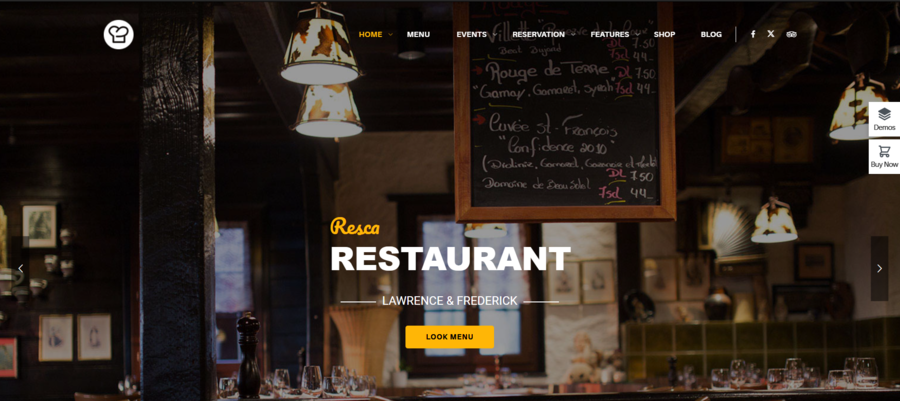
Resca is designed specifically for restaurants, cafes, and hotels with dining facilities. Resca offers a stunning built-in reservation system. Its elegant menu layouts and smooth scrolling make it a top choice for showcasing your property’s culinary offerings alongside your room listings.
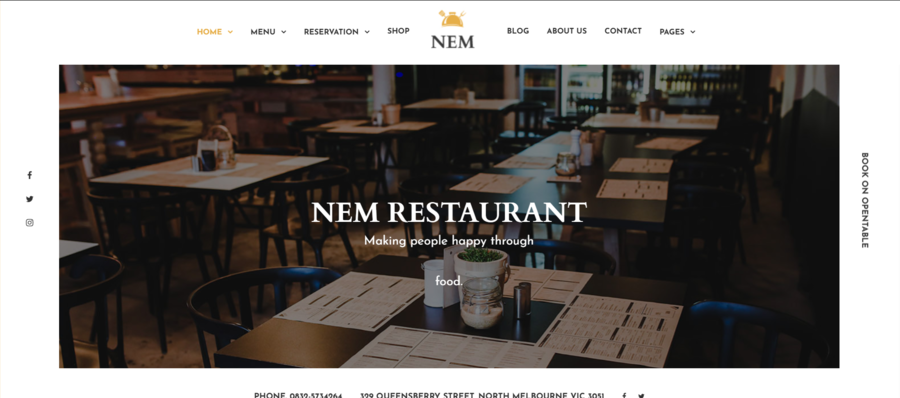
NEM is all about visual storytelling. Nem provides a clean, creative canvas with multiple homepage demos that are perfect for boutique hotels that want their restaurant to be a focal point. It is highly responsive, ensuring your menu and booking forms look great on mobile.
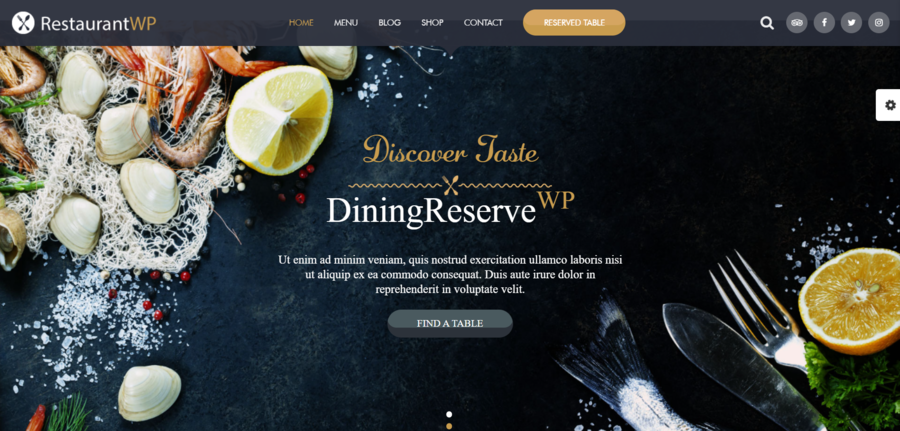
Restaurant WordPress Theme: If you are looking for a modern, high-performance design, this theme is an excellent fit. It features a powerful drag-and-drop builder and specialised layouts for event management and table bookings, making it easy to manage your entire hospitality business from a single WordPress dashboard.
For those running more complex establishments, you can even findhotel WordPress themes with beautiful designsthat integrate dining and lodging seamlessly.
Step 4: Build Your Online Restaurant Menu WordPress
The heart of any successful food business site is an online restaurant menu WordPress page. A common mistake many owners make is simply uploading a PDF of their physical menu. While this might seem easy, it is a poor experience for users on mobile devices who have to pinch and zoom to read small text. Instead, use a tool that allows you to build a web-based menu. Using free online menu restaurant maker tools ensures that your text is searchable by search engines and readable on any device.
Break your offerings into clear categories such as appetisers, main courses, and desserts to make browsing effortless. For each item, include a brief, appetising description that highlights unique ingredients or flavours. If you can, add high-quality photos for your most popular dishes, as visual appeal is a huge driver for orders.
A clean, well-organised digital menu is your best salesperson, guiding customers through their choices and encouraging them to add more to their cart. This refined approach makes it much easier for diners to decide what they want before they even arrive.
Step 5: Integrate a Restaurant Booking System WordPress
In today’s fast-paced environment, customers value the ability to secure a table without having to pick up the phone. Integrating a restaurant booking system WordPress plugin allows you to automate this entire process, saving your staff hours of manual work every week.
A high-performing reservation tool gives your diners a real-time view of available slots, allowing them to book a table at their convenience, even after your doors have closed for the night.
From the business side, these systems help you manage your floor plan more effectively and reduce the likelihood of double-bookings or lost notes. You can set up automated email or SMS confirmations to ensure that guests remember their appointments, which significantly lowers your no-show rate.
A refined reservation system acts as a reliable assistant, working 24/7 to fill your seats while you focus on providing excellent service in the kitchen and dining room.
Step 6: Configure Direct Online Ordering
Now that your menu is live, it is time to turn your site into a revenue-generating machine. By setting up direct ordering, you transform your digital presence from a simple brochure into a high-performing restaurant website builder solution.

Instead of paying heavy commissions to third-party delivery services that eat away at your margins, you can use tools like WooCommerce combined with a food-delivery plugin to handle everything yourself. This setup allows you to manage specific delivery zones, set minimum order amounts, and offer contactless pickup options directly from your own dashboard.
When you create a restaurant website with WordPress that handles its own transactions, you keep every cent of the profit for your kitchen. Additionally, you gain the ability to gather your own customer data through restaurant CRM platforms, which is invaluable for future marketing.
You can see what your regulars are ordering and send them tailored offers to keep them coming back. This refined approach to digital sales ensures that your business remains profitable and independent from external platforms that often dictate how you run your business.
Step 7: Launch and Local Search Refinement
Once all your features are in place, the final phase is making sure hungry locals can actually find your business. This is where you focus on a refined local search presence to ensure your site appears when someone searches for a meal in your area.
Start by making sure your business name, address, and phone number are perfectly consistent across the web, beginning with your Google Business Profile. Within your site, use location-based phrases that people actually type into search bars, such as “best brunch in [Your City].”
When you create a restaurant website with WordPress, you have access to various tools that help you manage these details without needing a technical degree. It is also a great idea to regularly update your site with news about upcoming events or seasonal specials.
Keeping your content fresh encourages search engines to rank your site higher than competitors who haven’t updated their pages in months. A well-refined search strategy ensures that when someone in your neighbourhood is looking for their next meal, your restaurant is the first one they see.
Frequently Asked Questions
Is it expensive to create a restaurant website with WordPress?
Not at all. While custom developers can charge thousands, building it yourself using WordPress is very cost-effective. Your main costs will be your domain and hosting. Most themes and essential tools have excellent free versions to get you started.
Do I need to know how to code?
No. Modern WordPress uses “drag-and-drop” editors. If you can create a PowerPoint presentation or edit a Word document, you can create a restaurant website with WordPress.
How do I make sure my menu looks good on phones?
By choosing a responsive restaurant WordPress theme, your site will automatically adjust to fit any screen size, whether it’s a tablet or a smartphone.
Conclusion
Building a digital home for your business is one of the smartest investments you can make this year. When you create a restaurant website with WordPress, you take back control of your brand, your customers, and your profits. You no longer have to rely on the whims of social media algorithms or the high fees of delivery platforms.
You don’t need a massive budget or deep technical knowledge—you just need a clear plan and the right tools. From your online restaurant menu WordPress to your restaurant booking system WordPress, every element should work together to provide a seamless experience for your guests. Your food is great; it’s time to make sure your website reflects that same level of quality and professionalism.
Read more: How to Start a Travel Blog with WordPress (With Theme Recommendations)
You may also like

How to Add a WordPress Hotel Booking System (Step by Step)
Posted on April 3, 2026Are you looking for a way to accept direct reservations on your website without paying high commission fees to third-party platforms? Whether you own a boutique hotel, a bed and breakfast, or a vacation rental, having an automated WordPress hotel booking system is essential for growing your business.
By allowing guests

How to Create a WordPress Booking Form in WordPress
Posted on March 27, 2026A WordPress booking form can completely change the way you run your business. By automating your scheduling, you can capture more leads, reduce administrative back-and-forth, and provide a better experience for your customers.
Whether you are a consultant, a doctor, or a small business owner, having a reliable WordPress booking plugin